
OG⌘ · Native macOS
Your everyday actions. One command away.
Select files in Finder. Open the launcher with ⌥Space. Type ..compress, ..pdf, or ..removebg. Get results without leaving your flow.
Requires macOS 14 Sonoma. Windows not released. No fake stats — just the product that ships.
Why OG⌘
Everyday file work, without the digression
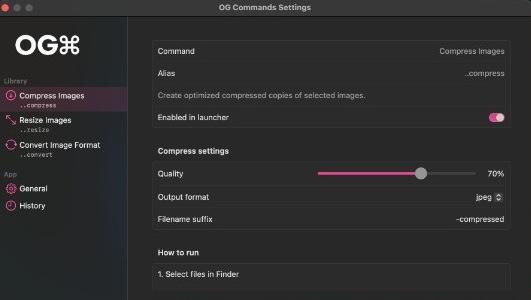
Built as a native Swift menu-bar app. Commands write copies to ~/Downloads/OG Commands by default. Configure once in Settings, then run from the typing panel.
Native macOS
Swift menu-bar app — not Electron. Fast launcher with ⌥Space.
Copies only
Image commands write new files. Safety rules stay consistent across commands.
On-device privacy
Processing stays local. ..removebg downloads a model only after you approve.
Real settings
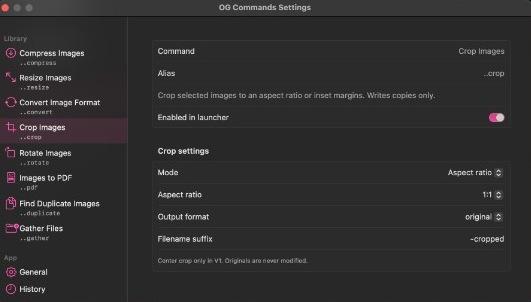
Tune quality, formats, crop ratios, and more in Commands & Settings.
Featured commands
What you can run today
Images
Compress Images
..compressCreate optimized compressed copies of selected images.
Images
Resize Images
..resizeResize selected images while preserving aspect ratio.
Images
Convert Image Format
..convertConvert selected images to another format (PNG, JPEG, HEIC, TIFF, WebP, and more).
Images
Crop Images
..cropCrop selected images to an aspect ratio or inset margins. Writes copies only.
Documents
Images to PDF
..pdfCombine selected images into a single PDF document.
On-device AI
Remove Background
..removebgRemove image backgrounds offline with an on-device ONNX model. Writes transparent PNG copies.
How it works
Select → Command → Done
01
Select
Pick images or files in Finder — or use the file picker if nothing is selected.
02
Command
Press ⌥Space, type a command like ..resize or ..removebg, then Return.
03
Done
Copies land in your output folder. Originals are never overwritten.
Privacy-first
Your files stay on your Mac
- Command execution is offline by default.
..removebgmay download an ONNX model once — only after explicit permission — then runs fully on-device.- No paid background-removal APIs. No invented analytics claims.
- Destructive duplicate cleanup asks before moving extras to Trash.
macOS
Download OG⌘ Commands
Version 0.1.0 · Requires macOS 14 Sonoma
Ad-hoc signed only (not Developer ID / not notarized)